In Game
Interface:
Within Video games, developers will add information vital to
the player so that they can play the game properly, this usually takes the form
of a Heads up Display or HUD. The HUD is a part of the User Interface or UI,
similar to a main menu or pause screen, however the HUD is always visible while
in game. Within a HUD no matter what type of game, the player will likely see
their characters health/stamina, ammunition and a mini map. These will
constantly be active so that the player can see all the important information
necessary to play the game. Parts of the HUD will be in their position for a
reason, so that they do not interfere directly with gameplay. For example you
wouldn’t find a health bar in the middle of the screen. Usually sections of the
HUD are confined to either sides of the screen towards the bottom or the top,
while things such as the aiming reticule will in the centre.
Other examples include main menus, another very important
part of a game. This is where you can load in your last save, change setting,
view statistics or start a new game. A menu should be easy to follow and
understand, it should also be clean and tidy otherwise players may find it
difficult to navigate the UI.
Below the image shows your characters health and stamina in
the top left, and the ammunition in the top right.

Print Media:
When designing a video game not only do developers need to
work on in game art/text, they also need to create and design relevant pieces
of promotional material and information, so that they can advertise their game
and market it. This usually takes the form of posters, box art and manuals.
Both posters and box art are similar in that they need to look eye catching,
and relevant to the game. The title of the game and logos would be used, along
with colours and possibly a character. This allows the developers to show off
their creation without giving too much away. On the right is a poster for DOOM
which contains the title and a character from the game. Similar to posters the box art is very important, it must
contain the title other than that it’s down to how the developer want’s the box
to look. A logo may also be include.
Along
with relevant colouring and possibly a character or location. The company May
decide to go with a less obvious design, using only one solid colour or leaving
no information other than a logo or title. This game has designed the box art
so that it relates to the game, they have included the main character and
placed the title at the top. Manuals are created to teach players the fundamentals of the
game. They must talk about the key aspects of the game which include, how to
play, the HUD and so on. Some may even go further and describe the story of the
game or discuss world lore. Below is an image of a Legend of Zelda game manual,
it describes in detail how to play the game.

Pixel Art:
Pixel Art is a form of digital art used frequently in older
games, where images are created at the pixel level using graphics editing
software. Pixel Art is loved in the video games community mainly due to its
rich heritage, the style was used in Super Mario, Castlevania and many other
well-known retro video games. Pixel Art is Unique in that one pixel is an
important component of one larger image. The style emerged in the ‘80s and ‘90s
as games became popular, but was used due to technical limitations of the
graphics cards at the time. The style later became obsolete as a new generation
of graphics cards became available and developers began to render 3D models
rather than 2D sprites.
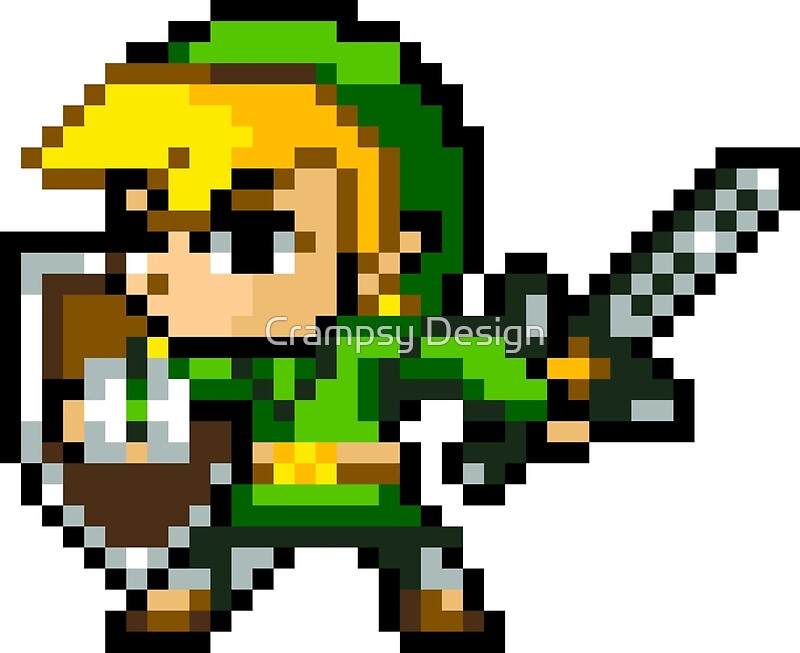
Here you can see this character has been produced using
Pixel Art. Notice the different shades of colour building up definition on the
character, this mimics the effects of lighting and gives the character a lot of
depth.
Concept
Art:
In games design concept art is essential into the whole idea
of the game, it represents the mood and feeling of a game in a form everyone
developing the game can understand. However Concept Art is not the same as
illustration, this is because Concept Artist strive to deliver ideas and
communicate them as effectively as possible whereas the role of an illustrator
is to create highly polished artwork. Concept Art is a must because it promotes
discussion and sparks interest, it gives other departments within the design to
work off these loose designs and build a world from a loose sketch.
This Concept Art demonstrates the basic idea the artist
wanted in the game, the designs are loose and untidy but that’s the point,
there is no need to pour tons of effort into something that is the very
baseline idea of a game.

Texture
Art:
In video Games every piece of geometry, terrains and
characters all have textures. Textures make up the complete visual aspect of a
game ranging from the very floor you walk on to the sky. A texture is a 2D
image used by artist to effectively, add colour to the game, but in a detailed way.
For example an Artist might use a grass texture for the floor or a rock texture
for a cliff face. The visual quality of the game depends on the quality of the
texture, for example if the developers wanted a Photorealistic style, Artists
would use high resolution photographs for their textures, whereas a cartoon
styled game would use, blocky coloured textures.
There are many different types of textures such as Normal
maps which mimic light patterns, specular and roughness maps which make the
texture more realistic and so on.
The better looking a texture the more immersive the game is
for the player, and therefore a better gameplay experience. Some developers
allow the community to openly modify the games style, games such as Minecraft
are popular with this, meaning the players can customise their own visual experience
of the game. I had an image prepared for this section and the following, but Blogger refused to publish with it.
Background
Graphics:
Background Graphics are the images/models you see in the
background of the game usually an unnoticed part of a game which is the point.
Background Graphics are not designed to stand out by any means, only to blend
into the environment the character plays in. This technique is commonly more
prominent in 2D titles than 3D but is almost always used in both. They’re
created by artist who use a graphics program to design these backgrounds and
make sure that they coincide nicely with the art style of the game. Backgrounds
can include trees, mountains, rivers and building to name a few, as long as
they blend with the style of the game they will work. This image was taken from the game Ori and the Blind Forest,
a 2D game which focused heavily on immersing the player into the world. You can
tell that the scenery is a forest therefore the background graphics should also
be a forest. Notice how the foreground and the Background merge perfectly.

No comments:
Post a Comment