
Tuesday, 31 October 2017

Compression/Image Capture/Optimisation/Storage of Image Assets
Compression
Compression is the process at which you reduce the size of an image, without degrading the quality. Because of the reduction in file size, your storage device is able to hold more high quality images while also reducing the time required, for images to be sent over the internet or downloaded. There are a few different ways in which a file can be compressed, the most common for the internet is the JPEG format which is used for photographs mainly. The smaller the image the smoother a website will run, therefore compression is an important part of graphics.
Image Capture
Image Capture is the simple act of using a device to capture an image, for example a photograph. By far the most common way of capturing an image is using a Camera/Smart Phone which you can then transfer to a computer and do what is necessary to the image. Other ways of capturing an image include Photocopying and Scanning. Motion Capture
Optimising
Optimising is where specifically for game development, you make sure that an image you are using is better suited to the platform you deploy your video game on. For example if you're developing a game for android you may opt for a compressed file size, so you can save as much storage as possible. Whereas if you where developing a game for a console or PC then you could use whichever format and still retain a high quality image. This is because there are less storage constraints on larger platforms so developers can exploit this and make game look as good as possible.
Storage of Image Assets
Storage of image assets is the how a user stores their assets that they have either created or edited. While working as part of a development company, the team may use a system where every developer contributes to a project over one storage device. This meaning that anyone part of the team has access to a graphic file and they can then change/edit things depending on their discipline. However in order to be accurate the assets must be stored in the correct folder, a model of a tree should be saved in a foliage folder or tree folder. Along with this a document should also be named correctly, a tree textured to look like it's in autumn should be titled in relation to this.
Compression is the process at which you reduce the size of an image, without degrading the quality. Because of the reduction in file size, your storage device is able to hold more high quality images while also reducing the time required, for images to be sent over the internet or downloaded. There are a few different ways in which a file can be compressed, the most common for the internet is the JPEG format which is used for photographs mainly. The smaller the image the smoother a website will run, therefore compression is an important part of graphics.
Image Capture
Image Capture is the simple act of using a device to capture an image, for example a photograph. By far the most common way of capturing an image is using a Camera/Smart Phone which you can then transfer to a computer and do what is necessary to the image. Other ways of capturing an image include Photocopying and Scanning. Motion Capture
Optimising
Optimising is where specifically for game development, you make sure that an image you are using is better suited to the platform you deploy your video game on. For example if you're developing a game for android you may opt for a compressed file size, so you can save as much storage as possible. Whereas if you where developing a game for a console or PC then you could use whichever format and still retain a high quality image. This is because there are less storage constraints on larger platforms so developers can exploit this and make game look as good as possible.
Storage of Image Assets
Storage of image assets is the how a user stores their assets that they have either created or edited. While working as part of a development company, the team may use a system where every developer contributes to a project over one storage device. This meaning that anyone part of the team has access to a graphic file and they can then change/edit things depending on their discipline. However in order to be accurate the assets must be stored in the correct folder, a model of a tree should be saved in a foliage folder or tree folder. Along with this a document should also be named correctly, a tree textured to look like it's in autumn should be titled in relation to this.
Monday, 9 October 2017
Destiny 1 Story:
Written by Dylan Garner
- Player made Guardian (Warlock) awakes from revive from Ghost, finds themselves on earth in a golden age rocket launching facility in Russia. The Ghost explains that a dangerous race of insectoid like beings known as the "Fallen" have over run the Russian facility.
- The unarmed Guardian reluctantly followed the Ghost into the Russian Defensive Wall, now a derelict marvel of man. Fallen chatter echoes throughout the wall interior.
- The Guardian finds himself in an armoury and secures himself a weapon.
- As the Guardian begins to exit the Armoury a Woman presents herself, caped in a cowl and armed with a rustic rifle she explains the extent of the fallen incursion.
- After convening for only two minuets a large explosions shook the wall, an alarm sounded and Eliksni screams rattled the derelict structure.
- The Guardian and Stranger both agree to work together to exit the wall safely, only so much progress could be made without being able to sneak past Fallen patrols, and conflict soon ensued.
- The two battled to an opening where an old space faring ship had crashed.
- The ship had a single seat cockpit, therefore only one of the two could leave, before the guardian could even say a word the stranger pulled a knife from her boot and thrusted it into the back of the guardians shin.
- As the ship took of a large Fallen Baron appears from the other side of the room and charges the guardian.
- After a short fight the two find themselves looking for a weapon, but the guardian managed to force the Baron to it's knees and after a short exchange of words offered to spare the barron in exchange for a functioning ship.
- The Barron agreed to the terms and the Guradian made it back to the Last City of Earth.
- Fully recovered the Guradian is tasked with investigating the assassination of a Fallen Kell on Venus.
- Arriving on Venus the Guardian fights through a dozen well armed Eliksni warriors, reaches the site of the assassination and meets a familar face, the stranger who attacked him.
- The two convened without threat and the stranger apologised and exsplaing her desperation.
- It appeared she had killed the Kell, and told the Guardian this particular Warlord had a lot of Human blood on its hands including her entire family and community.
- She warned the Guardian about a coming Eliksni attack on the City, exsplaing that with the Kell's final breath he promised complete destruction of the Human species. She gave the Guardian coordinates which would lead him to Earths Moon. then she vanished after the Guardian turned his back to examine the corpse.
- After deciding on their next course of the action the Guardian and Ghost both agreed to investigate the possibility of a second Eliksni attack on the city.
- The Guardian warns the city Vanguard of a possible attack, and followed the strangers coordinates to the moon.
- Upon reaching the Moon the Guardian and Ghost make their way to the coordinates and discover a large battle taking place between the Hive and the Fallen.
- The Guardian locates a Fallen data cash amongst a Golden Age colony and after fighting their way to it, discover that the Eliksni are merely attempting to take territory from the Hive.
- Upon discovering this revelation a bullet pierced the guardians shoulder, the stranger launched herself at the guardian with her knife, but the Warlock managed to summon a large amount of light and pushed the stranger into a console with a powerful force push.
- Being only human she spluttered blood from her mouth and fell from the damaged console to the floor, underneath the Guardians feet.
- The Warlock asked why she had attempted to kill him, and explained how she blamed the Guardians for not protecting her community. She insisted Guardians where no better than Fallen Barons and Hive wizards.
- Before the Warlock could leave an Eliksni taller and stronger than most, punched the Guardian to the floor and followed with an incredibly strong punch to the Guardians abdomen.
- The Warlock gained some ground in the fight, wounding the Eliksni but before the final blow could be delivered the Fallen warrior kicked the Guardian to the floor.
- Drawing a large decorated sword, the Eliksi prepared to take his prize but was severly wounded with a shot from the strangers rifle. The Fallen threw his sword striking the stranger in the chest killing her, seconds later the Eliksi had succumb to its wounds.
Thursday, 5 October 2017
File Extensions and Vector/Raster Images
Vector Images and Raster Images
What is a Vector/Raster image?
Vector images come under the file extensions PSD, WMF, FLA and AI. The main difference between vector images and raster images is that vector images can be lown up to any proportion and still retain a high quality image, wheras a raster image canot retain it's quality if it is blown up in size. A raster image is built using pixels conatining colours, but once the size changes the pixels cannont retain their appearance and the quality drops. A vector image is made up of paths each with a mathmatical forula, regardless of size the quality is unnaffected because the formulas dictate how the image is rendered.
A raster image would be perfect for a photograph because of how much colour the pixels can retain, a vector image wouldn't be suitable as a photograph because it can't display hte qualities of a photograph. A vector image would however would suit a corporate logo as it could be resized to fit onto a business car and then blown up to suite a bill board.
File Extensions
Whenever you save a document or download something the file will always have an extension, what extension is used depends on what type of file you download or what program you used to create said document. There are many different types, below you can see some of the extensions for either a Vector or Raster image.
Vector Extensions:
- .PSD Is a file with layered images used in Adobe Photoshop, the extension allows you to eddit the layers even after saving.
- .WMF Is a file extension for a graphics file used with Microsoft Windows, WMF files can contain both vector and bitmap image information.
- .FLA Is a file extension used by Adobe flash applications, these files store movies or animation.
- .AI Is a file extension used by Adobe Illustrator to save files created in this program. Commonly .AI files store logos.
Raster Extensions:
- .BMP Files or Bitmaps are a raster graphic format, .BMP format stores colour data without compression ensuring a high quality and crips image, the files however are quite large.
- .GIF Files are often an animated raster graphics file, the files are also compresses so they're quite small.
- .TIFF Files are used for storing high quality raster graphics, the format supports lossless compression so photos/images don't use as much space and because of this quality will not be comprimised.
- .JPG Files are used to save images in a compressed format, it is commonly used for storing photographs.
What is a Vector/Raster image?
Vector images come under the file extensions PSD, WMF, FLA and AI. The main difference between vector images and raster images is that vector images can be lown up to any proportion and still retain a high quality image, wheras a raster image canot retain it's quality if it is blown up in size. A raster image is built using pixels conatining colours, but once the size changes the pixels cannont retain their appearance and the quality drops. A vector image is made up of paths each with a mathmatical forula, regardless of size the quality is unnaffected because the formulas dictate how the image is rendered.
A raster image would be perfect for a photograph because of how much colour the pixels can retain, a vector image wouldn't be suitable as a photograph because it can't display hte qualities of a photograph. A vector image would however would suit a corporate logo as it could be resized to fit onto a business car and then blown up to suite a bill board.
File Extensions
Whenever you save a document or download something the file will always have an extension, what extension is used depends on what type of file you download or what program you used to create said document. There are many different types, below you can see some of the extensions for either a Vector or Raster image.
Vector Extensions:
- .PSD Is a file with layered images used in Adobe Photoshop, the extension allows you to eddit the layers even after saving.
- .WMF Is a file extension for a graphics file used with Microsoft Windows, WMF files can contain both vector and bitmap image information.
- .FLA Is a file extension used by Adobe flash applications, these files store movies or animation.
- .AI Is a file extension used by Adobe Illustrator to save files created in this program. Commonly .AI files store logos.
Raster Extensions:
- .BMP Files or Bitmaps are a raster graphic format, .BMP format stores colour data without compression ensuring a high quality and crips image, the files however are quite large.
- .GIF Files are often an animated raster graphics file, the files are also compresses so they're quite small.
- .TIFF Files are used for storing high quality raster graphics, the format supports lossless compression so photos/images don't use as much space and because of this quality will not be comprimised.
- .JPG Files are used to save images in a compressed format, it is commonly used for storing photographs.
What is a Pixel?
Picture resolution
What is a Pixel?
A pixel is commonly thought of as "a square of colour" however this is incorrect. A pixel should be thought of as a point, this point can actually contain up to three primary colours which then contributes to the full image. Depending on the size of your monitor/screen only a certain amount of pixels can displayed, the lager the screen the better the quality of image.
Image Resolution:
Image resolution is effectively the quality of an image. The higher the resolution the higher the quality, the image becomes sharper, more defined and better detailed. This is because there is more information in the same space, any displayable digital device will have a certain number of pixels that it can display.

Image Resolution:
Image resolution is effectively the quality of an image. The higher the resolution the higher the quality, the image becomes sharper, more defined and better detailed. This is because there is more information in the same space, any displayable digital device will have a certain number of pixels that it can display.
In the above image you can see how the number of pixels affects the quality of the image, looking at a 10 x 10 circle you can see how basic the image is. Because the edges are so jagged it doesn't even identify as a circle. However in the 25 x 25 diagram you can clearly see that it is a circle and the overall shape is better defined. With the 100 x 100 image the circle is clear and no jagged edges are visible.
Picture Resolution:
Picture resolution is slightly different from image resolution in that it is based around the graphical capability of the device that is used to capture a real life picture. For example if somebody draws with a pen and pencil, photographs it with a digital camera and then import it into a computer, the resolution of the picture depends on the digital camera used to take the photo.
Intensity:
Within graphic design programs such as Photoshop there are thousands of colours available, for these colours they each have a value which defines how many shades of that colour there are. For example the colour red would have many shades from darker reds to lighter reds. Intensity is where for example you would use however many shades of a colour to colour something in a program. The more the shades you use the more values are used therefore the higher the intensity.

In the above image there are several of the many shades of red, each shade has a value assigned to it, and depending on how many are dictates the level of intensity.
Picture resolution is slightly different from image resolution in that it is based around the graphical capability of the device that is used to capture a real life picture. For example if somebody draws with a pen and pencil, photographs it with a digital camera and then import it into a computer, the resolution of the picture depends on the digital camera used to take the photo.
Intensity:
Within graphic design programs such as Photoshop there are thousands of colours available, for these colours they each have a value which defines how many shades of that colour there are. For example the colour red would have many shades from darker reds to lighter reds. Intensity is where for example you would use however many shades of a colour to colour something in a program. The more the shades you use the more values are used therefore the higher the intensity.
In the above image there are several of the many shades of red, each shade has a value assigned to it, and depending on how many are dictates the level of intensity.
My Gaming Machines - Then and Now
Sega's Dreamcast
Released in Japan in 1998 and 1999 in Europe it was the first of the sixth generation of consoles and marked the end Sega's Console market. The console wasn't as successful as expected however large titles made it to the system such as Soul calibre, Unreal Tournament and Quake.
Specs:
- CPU Hitachi SH-4 bit RISC
- Memory 16 MB Ram, 8 MB video RAM, 2MB audio RAM
- Graphics NEC CLX2 Processor
On a personal level I will always admire the console especially since it had solid 3D capability's. The console was a great platform for FPS games, and paved the way for modern shooters.
Microsoft's Xbox One
An eighth generation console, it was announced in 2013 and was the successor to the high grossing Xbox 360. It was a direct competitor to Sony's PlayStation 4 which had gained a lot of support. Several games where announced to release alongside the Xbox One including Dead Rising 3 Forza 5 and Shadow of Mordor. The console was very successful but couldn't quite keep up with Sony's PlayStation sales. Recently the console has been revamped with newer editions like the Xbox One s and the Xbox One X, which hare noticeably better than the Sony's PlayStation 4 Pro.
Specs:
- CPU 8 Core AMD
Microsoft's Xbox One
An eighth generation console, it was announced in 2013 and was the successor to the high grossing Xbox 360. It was a direct competitor to Sony's PlayStation 4 which had gained a lot of support. Several games where announced to release alongside the Xbox One including Dead Rising 3 Forza 5 and Shadow of Mordor. The console was very successful but couldn't quite keep up with Sony's PlayStation sales. Recently the console has been revamped with newer editions like the Xbox One s and the Xbox One X, which hare noticeably better than the Sony's PlayStation 4 Pro.
Specs:
- CPU 8 Core AMD
- Memory 8GB DDR3
- Storage 500 GB
- Storage 500 GB
Wednesday, 4 October 2017
Dark Souls 2 Review
Dark Souls 2 - Fromsofts underdog
The Dark Souls series is a critically acclaimed series of games, developed by Japanese company FromSoftware and is the brain child of Hidetaka Miyazaki. Dark Souls 2 is a game of controversy however, mainly due to the game not being what fans wanted. The game is still very much a "Dark Souls" game but some fans thought otherwise. With the first game of the series directed by Miyazaki himslef, fans exspected the second to also be headed by him but where left dissapionted, knowing that he was tied up with another project of his that came to become BloodBorne. However did this truly affect the series in a negative way?
This game, released in 2014, explored another side to the Dark Souls universe. Set on a completely different landmass (or not), Drangleic is a land rife with challenge and adversity and is gripped with the all consuming Undead Curse. The game explores the theme of hope, an undead pilgrim with very little to set him or her apart from the other hollows must embark on a tiresome journey to Link the Fire. An arduous journey indeed as the Dark Souls series is known for it's challenge. The game also exsplores the themes of fear, whether it's the boss' or the enemies or even the NPC's this game strives to keep you on edge, stressing your mental and emotional connection to the game. Drangleic was once a thriving kingdom ruled by it's monarcy, King Vendrick and Queen Nashandra, but even monarchs with the greatest of souls where not immune to the all consuming curse.
Dark souls 2 is a role playing game with multiplayer capability, you play the role of a character you yourself can design before beginning your journey across Drangleic. The game is of course 3D in the third person perspective. If the thought of taking on this challange frightens you, you can playthrough the game with your freinds and engage in "Jolly Cooperation". Taking on boss' together only makes this game better. If cooperation is not your thing, you can invade another human player and reap the rewards of your covanent if you successfully kill your target.
Visually Dark Souls 2 is very odd, the environments seem to be lacking in geometry and textures are blatantly repeated. For example in the first area of the game "Forest of Fallen Giants" the mossy overgrown style is very fitting however the texture is very overused and little thought went into the design. The world doesn't have as much depth as the first Dark Souls however the intricate Souls style level design is very much in use, but is almost made redundant by the traveling system which is given to the player instantly. The story, as commenly seen in Souls games, is obscure and certainly not given to you like most conventional games. You have to dig for lore found on items, character dialogues and even the boss' and enemies found throughoput Drangleic. The controls are classic Souls style, with only one change being the jump mechanic switching from the "B" button to the "Left Stick". The gameplay is subblime, the game is very polished and is of a high quality indeed which is certainly the games strongest aspect.
Out of the three games this one to many is the worst, however in my opinion it's my favourite of the three. By no means the hardest of the three nor the most in depth, I do believe that the daring changes made by the developers have worked rather well, after all it's still very much a Dark Souls game. I love the world of Drangleic and the lore surounding the kingdom.
Official game trailer: https://youtu.be/U6uyuIQYlfY
Gameplay reveal: https://youtu.be/z_JFDPCtXFY?t=48s 0:48 - 4:12
The Dark Souls series is a critically acclaimed series of games, developed by Japanese company FromSoftware and is the brain child of Hidetaka Miyazaki. Dark Souls 2 is a game of controversy however, mainly due to the game not being what fans wanted. The game is still very much a "Dark Souls" game but some fans thought otherwise. With the first game of the series directed by Miyazaki himslef, fans exspected the second to also be headed by him but where left dissapionted, knowing that he was tied up with another project of his that came to become BloodBorne. However did this truly affect the series in a negative way?
This game, released in 2014, explored another side to the Dark Souls universe. Set on a completely different landmass (or not), Drangleic is a land rife with challenge and adversity and is gripped with the all consuming Undead Curse. The game explores the theme of hope, an undead pilgrim with very little to set him or her apart from the other hollows must embark on a tiresome journey to Link the Fire. An arduous journey indeed as the Dark Souls series is known for it's challenge. The game also exsplores the themes of fear, whether it's the boss' or the enemies or even the NPC's this game strives to keep you on edge, stressing your mental and emotional connection to the game. Drangleic was once a thriving kingdom ruled by it's monarcy, King Vendrick and Queen Nashandra, but even monarchs with the greatest of souls where not immune to the all consuming curse.
Dark souls 2 is a role playing game with multiplayer capability, you play the role of a character you yourself can design before beginning your journey across Drangleic. The game is of course 3D in the third person perspective. If the thought of taking on this challange frightens you, you can playthrough the game with your freinds and engage in "Jolly Cooperation". Taking on boss' together only makes this game better. If cooperation is not your thing, you can invade another human player and reap the rewards of your covanent if you successfully kill your target.
Visually Dark Souls 2 is very odd, the environments seem to be lacking in geometry and textures are blatantly repeated. For example in the first area of the game "Forest of Fallen Giants" the mossy overgrown style is very fitting however the texture is very overused and little thought went into the design. The world doesn't have as much depth as the first Dark Souls however the intricate Souls style level design is very much in use, but is almost made redundant by the traveling system which is given to the player instantly. The story, as commenly seen in Souls games, is obscure and certainly not given to you like most conventional games. You have to dig for lore found on items, character dialogues and even the boss' and enemies found throughoput Drangleic. The controls are classic Souls style, with only one change being the jump mechanic switching from the "B" button to the "Left Stick". The gameplay is subblime, the game is very polished and is of a high quality indeed which is certainly the games strongest aspect.
Out of the three games this one to many is the worst, however in my opinion it's my favourite of the three. By no means the hardest of the three nor the most in depth, I do believe that the daring changes made by the developers have worked rather well, after all it's still very much a Dark Souls game. I love the world of Drangleic and the lore surounding the kingdom.
Official game trailer: https://youtu.be/U6uyuIQYlfY
Gameplay reveal: https://youtu.be/z_JFDPCtXFY?t=48s 0:48 - 4:12
Sunday, 1 October 2017
Unit 78 Computer Game Graphics
In Game
Interface:
Within Video games, developers will add information vital to
the player so that they can play the game properly, this usually takes the form
of a Heads up Display or HUD. The HUD is a part of the User Interface or UI,
similar to a main menu or pause screen, however the HUD is always visible while
in game. Within a HUD no matter what type of game, the player will likely see
their characters health/stamina, ammunition and a mini map. These will
constantly be active so that the player can see all the important information
necessary to play the game. Parts of the HUD will be in their position for a
reason, so that they do not interfere directly with gameplay. For example you
wouldn’t find a health bar in the middle of the screen. Usually sections of the
HUD are confined to either sides of the screen towards the bottom or the top,
while things such as the aiming reticule will in the centre.
Other examples include main menus, another very important
part of a game. This is where you can load in your last save, change setting,
view statistics or start a new game. A menu should be easy to follow and
understand, it should also be clean and tidy otherwise players may find it
difficult to navigate the UI.
Below the image shows your characters health and stamina in
the top left, and the ammunition in the top right.

Print Media:
When designing a video game not only do developers need to
work on in game art/text, they also need to create and design relevant pieces
of promotional material and information, so that they can advertise their game
and market it. This usually takes the form of posters, box art and manuals.
Both posters and box art are similar in that they need to look eye catching,
and relevant to the game. The title of the game and logos would be used, along
with colours and possibly a character. This allows the developers to show off
their creation without giving too much away. On the right is a poster for DOOM
which contains the title and a character from the game. Similar to posters the box art is very important, it must
contain the title other than that it’s down to how the developer want’s the box
to look. A logo may also be include.
Along
with relevant colouring and possibly a character or location. The company May
decide to go with a less obvious design, using only one solid colour or leaving
no information other than a logo or title. This game has designed the box art
so that it relates to the game, they have included the main character and
placed the title at the top. Manuals are created to teach players the fundamentals of the
game. They must talk about the key aspects of the game which include, how to
play, the HUD and so on. Some may even go further and describe the story of the
game or discuss world lore. Below is an image of a Legend of Zelda game manual,
it describes in detail how to play the game.

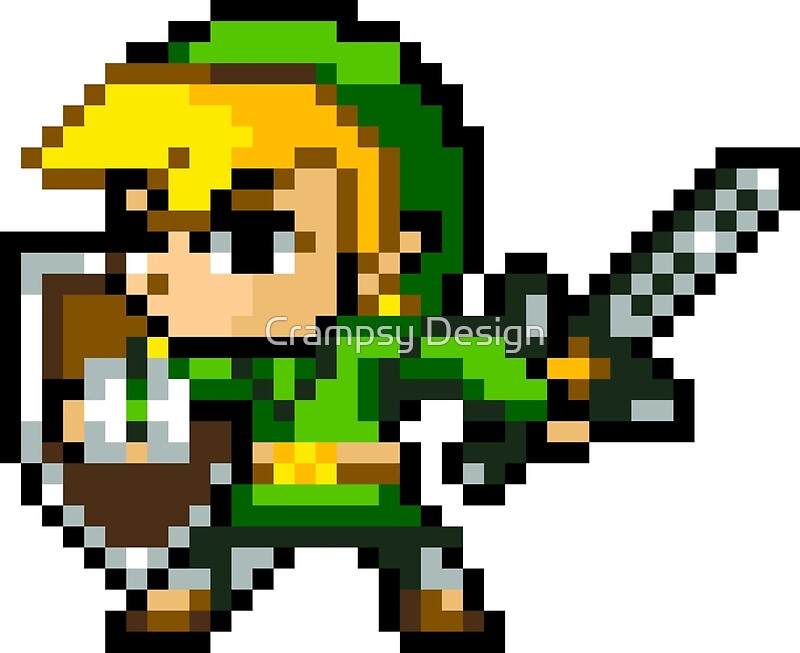
Pixel Art:
Pixel Art is a form of digital art used frequently in older
games, where images are created at the pixel level using graphics editing
software. Pixel Art is loved in the video games community mainly due to its
rich heritage, the style was used in Super Mario, Castlevania and many other
well-known retro video games. Pixel Art is Unique in that one pixel is an
important component of one larger image. The style emerged in the ‘80s and ‘90s
as games became popular, but was used due to technical limitations of the
graphics cards at the time. The style later became obsolete as a new generation
of graphics cards became available and developers began to render 3D models
rather than 2D sprites.
Here you can see this character has been produced using
Pixel Art. Notice the different shades of colour building up definition on the
character, this mimics the effects of lighting and gives the character a lot of
depth.
Concept
Art:
In games design concept art is essential into the whole idea
of the game, it represents the mood and feeling of a game in a form everyone
developing the game can understand. However Concept Art is not the same as
illustration, this is because Concept Artist strive to deliver ideas and
communicate them as effectively as possible whereas the role of an illustrator
is to create highly polished artwork. Concept Art is a must because it promotes
discussion and sparks interest, it gives other departments within the design to
work off these loose designs and build a world from a loose sketch.
This Concept Art demonstrates the basic idea the artist
wanted in the game, the designs are loose and untidy but that’s the point,
there is no need to pour tons of effort into something that is the very
baseline idea of a game.

Texture
Art:
In video Games every piece of geometry, terrains and
characters all have textures. Textures make up the complete visual aspect of a
game ranging from the very floor you walk on to the sky. A texture is a 2D
image used by artist to effectively, add colour to the game, but in a detailed way.
For example an Artist might use a grass texture for the floor or a rock texture
for a cliff face. The visual quality of the game depends on the quality of the
texture, for example if the developers wanted a Photorealistic style, Artists
would use high resolution photographs for their textures, whereas a cartoon
styled game would use, blocky coloured textures.
There are many different types of textures such as Normal
maps which mimic light patterns, specular and roughness maps which make the
texture more realistic and so on.
The better looking a texture the more immersive the game is
for the player, and therefore a better gameplay experience. Some developers
allow the community to openly modify the games style, games such as Minecraft
are popular with this, meaning the players can customise their own visual experience
of the game. I had an image prepared for this section and the following, but Blogger refused to publish with it.
Background
Graphics:
Background Graphics are the images/models you see in the
background of the game usually an unnoticed part of a game which is the point.
Background Graphics are not designed to stand out by any means, only to blend
into the environment the character plays in. This technique is commonly more
prominent in 2D titles than 3D but is almost always used in both. They’re
created by artist who use a graphics program to design these backgrounds and
make sure that they coincide nicely with the art style of the game. Backgrounds
can include trees, mountains, rivers and building to name a few, as long as
they blend with the style of the game they will work. This image was taken from the game Ori and the Blind Forest,
a 2D game which focused heavily on immersing the player into the world. You can
tell that the scenery is a forest therefore the background graphics should also
be a forest. Notice how the foreground and the Background merge perfectly.
Subscribe to:
Comments (Atom)